
How to Learn JavaScript in 2027? A Complete Beginner-to-Advanced Roadmap
Posted on
Product Design
Posted at

"I want to learn JavaScript, but where do I start?" It's one of the most common questions in web development, and it's also one of the hardest to answer with a single sentence — because JavaScript is a big language attached to an even bigger ecosystem. It runs in every browser, powers backend servers through Node.js, drives mobile apps, and sits underneath nearly every popular frontend framework you've heard of. That scope is exactly why beginners get overwhelmed: there's no shortage of tutorials, but there's rarely a clear path connecting one lesson to the next.
The good news is that learning JavaScript doesn't require a computer science degree, a perfect memory, or years of prior coding experience. It requires a sensible order of topics, consistent practice, and a willingness to get comfortable being confused for a while. This guide lays out that order.
The best way to learn JavaScript is to understand the fundamentals, practice them through small exercises, build increasingly complex projects, and only then move into frameworks and advanced development. Everything in this guide is built around that sequence — what to learn first, how long it realistically takes, which projects actually teach you something, and how to know when you're ready to move forward.
1. What Is JavaScript?
JavaScript is a programming language originally built to make web pages interactive. If HTML gives a page its structure and CSS gives it its look, JavaScript gives it behavior — the parts that respond, update, or change without the page needing to reload.
A simple way to think about the split:
HTML = structure (the skeleton of the page)
CSS = presentation (how it looks)
JavaScript = behavior and interaction (what it does)
On the client side, JavaScript runs directly in the browser. It listens for clicks, validates form inputs, updates content on the fly, and fetches data from servers without refreshing the page. On the server side, thanks to a runtime called Node.js, JavaScript can also handle databases, authentication, and API logic — the same language on both ends of an application.
Some everyday examples of JavaScript at work:
Dropdown menus and navigation bars
Form validation before you hit submit
Interactive dashboards with live-updating charts
Image sliders and carousels
Shopping carts that update totals instantly
Search bars that filter results as you type
Real-time apps like chat tools or collaborative documents
Browser-based games
JavaScript isn't a niche skill anymore — it's closer to a default expectation for anyone building for the web.
2. Why Should You Learn JavaScript in 2026?
JavaScript isn't automatically "the best" programming language — that claim depends entirely on what you're trying to build. But it does sit at an unusually central point in modern software development, which is why so many learning paths pass through it.
Frontend development is still JavaScript's home turf. Every interactive website you use relies on it, and the major frontend frameworks — React, Vue, and Angular — are all JavaScript-based.
Backend development became a serious option once Node.js let developers run JavaScript outside the browser. Combined with frameworks like Express, JavaScript now powers APIs, servers, and full backend systems.
Full-stack development is arguably where JavaScript has the strongest advantage: the same language on the frontend and backend means less context-switching and a smaller mental overhead for solo developers and small teams.
Beyond the web, JavaScript extends into mobile development, desktop applications, and browser APIs that interact with hardware, storage, and notifications. It also has one of the largest open-source ecosystems of any language, with npm hosting an enormous number of packages that solve problems you'd otherwise build from scratch.
You'll also see JavaScript connected to a wide technology ecosystem:
React and Next.js for building modern user interfaces and full-stack apps
Vue and Angular as alternative frontend frameworks
Node.js and Express for backend development
TypeScript for adding type safety on top of JavaScript
None of this means JavaScript is right for every project. But for web development specifically, it's difficult to avoid — and that's precisely why it remains one of the most practical languages to learn.
3. Can a Complete Beginner Learn JavaScript?
Yes. Previous programming experience helps, but it isn't required. What actually matters more than prior coding knowledge is a willingness to think in small, logical steps and to sit with problems that don't resolve immediately.
Things that genuinely help beginners succeed:
Basic computer literacy (files, folders, browsers)
Comfort with logical thinking — following "if this, then that" reasoning
Some familiarity with HTML and CSS, though not mandatory
Patience with slow, incremental progress
Consistency over intensity — regular short sessions beat occasional long ones
One mistake almost every beginner makes early on is trying to memorize the entire language before writing anything. That approach doesn't work, and it isn't how experienced developers operate either. JavaScript has hundreds of built-in methods and countless syntax variations — nobody carries all of it in their head. What matters is understanding core programming concepts (variables, loops, functions, conditionals) well enough to recognize them anywhere, and knowing how to look up the rest.
4. Should You Learn HTML and CSS Before JavaScript?
For web development specifically, yes — some HTML and CSS knowledge makes JavaScript far more useful early on, since most beginner projects involve manipulating a webpage.
Technology | Main Purpose |
|---|---|
HTML | Structure |
CSS | Styling |
JavaScript | Behavior and functionality |
You don't need to master HTML and CSS first. A working knowledge is enough to start. Before diving seriously into JavaScript, it helps to be comfortable with:
HTML basics:
Common elements (divs, headings, paragraphs, lists)
Attributes
Forms and inputs
Links and images
Semantic HTML (using tags that describe meaning, not just appearance)
Basic document structure
CSS basics:
Selectors
The box model (margin, border, padding, content)
Flexbox
Grid
Responsive design basics
Basic positioning
If you already know HTML and CSS, you can move into JavaScript immediately. If you don't, a few weeks of focused HTML/CSS practice will make your first JavaScript projects far less frustrating, since you won't be learning three things simultaneously.
5. What Do You Need to Start Learning JavaScript?
The setup for learning JavaScript is refreshingly simple — you don't need expensive hardware or specialized software.
At minimum, you need:
A computer (Windows, macOS, or Linux all work fine)
A modern browser (Chrome, Firefox, or Edge)
A code editor
A stable internet connection for documentation and practice platforms
Commonly used tools in the JavaScript world:
Visual Studio Code — the most widely used code editor for JavaScript, free and highly extensible
Chrome DevTools or Firefox Developer Tools — built into browsers, used to inspect elements, debug scripts, and test code live
Node.js — lets you run JavaScript outside the browser and is required for most modern development workflows
npm — Node's package manager, used to install and manage external libraries
You don't need to install anything fancy to get started. Many beginners write their first scripts directly in the browser console or a simple HTML file with a <script> tag before ever touching Node.js. Add tools as you need them, not because a tutorial told you to install everything on day one.
6. JavaScript Learning Roadmap
Here's a stage-by-stage progression from zero to advanced. It's not strictly linear — some stages overlap — but the order reflects what tends to build most naturally on what came before.
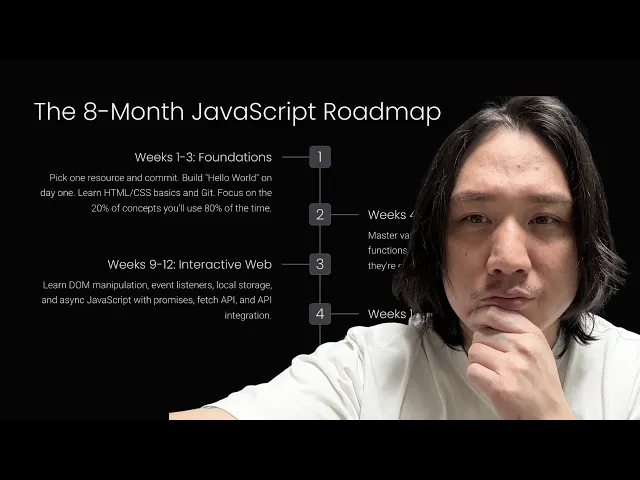
Stage 1: Programming Fundamentals — variables, data types, operators, expressions, comments, and basic input/output concepts.
Stage 2: Control Flow — if/else, switch statements, comparison and logical operators, and loops (for, while, do...while).
Stage 3: Functions — declarations, expressions, parameters, arguments, return values, arrow functions, and scope.
Stage 4: Data Structures — arrays, objects, strings, and the less common but useful Sets and Maps.
Stage 5: Modern JavaScript — let and const, template literals, destructuring, spread/rest syntax, modules, optional chaining, and nullish coalescing.
Stage 6: DOM Manipulation — selecting and modifying elements, handling events, and working with forms.
Stage 7: Asynchronous JavaScript — callbacks, promises, async/await, the Fetch API, and error handling.
Stage 8: Advanced JavaScript — closures, higher-order functions, prototypes, classes, the this keyword, the event loop, execution context, hoisting, and memory concepts.
Stage 9: Projects — building progressively harder applications that combine everything above.
Stage 10: Frameworks — React, Vue, Angular, or Next.js, chosen based on your career goals.
This roadmap works as a mental map more than a rigid schedule. Some stages, like functions and DOM manipulation, you'll revisit constantly as you build real projects.
7. JavaScript Fundamentals You Must Learn
Variables
JavaScript has three ways to declare variables: var, let, and const. Modern JavaScript generally favors let for values that change and const for values that don't, largely because they behave more predictably than the older var, which can lead to confusing bugs around scope.
Learn More: https://www.w3schools.com/js/js_variables.asp
Data Types
JavaScript's core data types include:
String — text, like
"hello"Number — numeric values, like
42or3.14Boolean —
trueorfalseUndefined — a variable that's been declared but not assigned
Null — an intentional "no value"
BigInt — for numbers larger than the standard Number type can safely handle
Symbol — a unique, immutable value often used as object keys
Object — collections of key-value pairs, including arrays and functions
Operators
You'll use these constantly:
Arithmetic:
+,-,*,/,%Assignment:
=,+=,-=Comparison:
===,!==,>,<Logical:
&&,||,!Ternary: a compact if/else —
condition ? valueIfTrue : valueIfFalse
Conditional Statements
Conditionals let your program make decisions — this is the foundation of almost everything you'll build.
8. How to Learn JavaScript Functions
Functions are arguably the single most important concept in programming. A function is a reusable block of instructions — write it once, run it as many times as you want.
Functions take parameters (placeholders defined when you write the function) and are called with arguments (the actual values you pass in). Many functions return a value, which is what makes them useful inside larger expressions.
There are a few ways to write functions in JavaScript:
Both do the same thing. Arrow functions are common in modern codebases because they're shorter and behave differently with the this keyword — a distinction that matters more once you start working inside objects and classes.
Understanding scope — which parts of your code can "see" a given variable — is closely tied to functions. Variables declared inside a function generally aren't accessible outside it, which helps keep code organized and prevents accidental interference between different parts of a program.
9. Learn Arrays and Objects
Arrays and objects are how JavaScript organizes real data, and almost every practical application relies heavily on both.
Arrays
An array is an ordered list of values.
You'll use array methods constantly:
map()— transforms every item and returns a new arrayfilter()— returns only items that match a conditionreduce()— combines all items into a single valuefind()— returns the first matching itemforEach()— runs a function on every itemsome()— checks if at least one item matches a conditionevery()— checks if all items match a condition
Objects
An object stores related data as key-value pairs — useful for representing real-world things like users, products, or orders.
Destructuring lets you pull values out of objects (or arrays) more cleanly:
Once you're comfortable combining arrays of objects — like a list of products, each with a name and price — you're working with the exact patterns used in real applications.
10. Learn DOM Manipulation
The DOM (Document Object Model) is the browser's live representation of your HTML page. JavaScript uses the DOM to read and change what's on screen without reloading the page.
Common methods for selecting elements:
querySelector()andquerySelectorAll()getElementById()
Common ways to change content:
textContentinnerHTMLclassList(for adding/removing CSS classes)createElement(),append(),remove()
Events are how JavaScript responds to user actions — clicks, form submissions, typing, mouse movement, and key presses.
A simple example — a button that changes text when clicked:
This small pattern — select an element, listen for an event, update the page — is the backbone of nearly every interactive feature you'll build early on.
11. Learn Asynchronous JavaScript
Not everything in a program can happen instantly. Fetching data from a server, waiting for a file to load, or handling a delayed response all take time — and JavaScript needs a way to handle that without freezing the entire page while it waits.
This is where asynchronous JavaScript comes in. Instead of blocking everything until a task finishes, JavaScript can start a task, move on to other work, and come back once the result is ready.
Real-world situations where this matters:
Fetching data from an API
Loading content from a server
Submitting a form and waiting for confirmation
Waiting on a slow network response
There are three main approaches you'll encounter, roughly in the order they were introduced:
Callbacks — functions passed into other functions to run once a task completes. Useful to understand, but can get messy when chained repeatedly (sometimes called "callback hell").
Promises — objects representing a value that will exist eventually, either resolved (success) or rejected (failure).
async/await — a cleaner syntax built on top of promises that lets asynchronous code read almost like regular, synchronous code.
The try/catch/finally structure handles errors gracefully — try runs the code, catch handles anything that goes wrong, and finally runs regardless of the outcome. Learning to read and write this pattern comfortably is one of the clearest signals that you've moved past beginner-level JavaScript.
12. Learn APIs and JSON
An API (Application Programming Interface) is how one piece of software communicates with another — most commonly, how your frontend JavaScript talks to a backend server to send or receive data.
Key concepts:
GET — retrieve data
POST — send new data
PUT/PATCH — update existing data
DELETE — remove data
JSON — the data format most APIs use to send information, structured as readable key-value pairs
A simple example of retrieving data:
Understanding how to send requests, handle responses, and manage errors is essential for almost any modern JavaScript application — from a simple weather widget to a full e-commerce site.
13. How to Practice JavaScript Effectively
Watching tutorials feels like progress, but it's a poor substitute for actually solving problems. The gap between "I understood that video" and "I can build this myself" is often much bigger than beginners expect.
A practical cycle to follow:
Learn → Practice → Build → Break → Debug → Repeat
Specific practices that build real skill:
Solving small coding exercises regularly
Rebuilding tutorial examples from memory, without looking at the solution
Intentionally breaking your own code, then fixing it
Building small, self-directed mini-projects
Reading official documentation instead of only searching for pre-written answers
Explaining a concept out loud or in writing, as if teaching someone else
There's a well-known trap in self-taught programming often called tutorial hell — endlessly consuming tutorials without producing independent work. It feels productive because you're constantly learning something new, but it rarely translates into the ability to build without guidance.
The alternative is active learning: attempting a problem before watching the solution, struggling with it for a reasonable amount of time, and only then checking your approach against an explanation. This is slower and more frustrating in the short term, but it's the difference between recognizing code and being able to write it yourself.
14. Best JavaScript Projects for Beginners
Projects reveal gaps that tutorials hide. You can watch someone build a to-do app a dozen times and still get stuck the moment you try it yourself — that's normal, and it's the point.
Beginner Projects
Counter — teaches state, event listeners, and DOM updates
Digital clock — teaches Date objects and timing functions
Calculator — teaches operators, functions, and event handling
Random number generator — teaches basic logic and randomness
Color changer — teaches DOM styling and events
Tip calculator — teaches input handling and basic math
Simple quiz — teaches conditionals and scoring logic
Intermediate Projects
To-do application — teaches arrays, local storage, and CRUD-style logic
Weather application — teaches API requests and async JavaScript
Expense tracker — teaches arrays of objects and calculations
Notes application — teaches persistent data and DOM rendering
Movie search application — teaches API integration and dynamic rendering
Recipe finder — teaches filtering and API data handling
Quiz application — teaches more complex state management
GitHub profile finder — teaches working with real-world public APIs
Advanced Projects
E-commerce frontend — teaches complex state, cart logic, and UI structure
Admin dashboard — teaches data visualization and layout complexity
Real-time chat application — teaches WebSockets or real-time data handling
Project management application — teaches complex CRUD and drag-and-drop interactions
Authentication system — teaches security basics, tokens, and form handling
Full-stack blog — teaches connecting frontend and backend
SaaS dashboard — teaches combining APIs, auth, and data visualization at scale
Aim to fully finish a smaller number of projects rather than starting many and abandoning most. A completed weather app teaches you more than five half-built ones.
15. How Long Does It Take to Learn JavaScript?
There's no single honest answer here — it depends on prior experience, daily consistency, and what "learning JavaScript" means to you. But rough, realistic ranges look like this:
1–2 Months — Comfortable with basic syntax and programming fundamentals: variables, conditionals, loops, and simple functions.
3–4 Months — Working knowledge of the DOM, APIs, and intermediate concepts, with a handful of small projects completed.
5–6 Months — More advanced JavaScript concepts and early exposure to a framework's fundamentals.
6–12+ Months — Building portfolio-quality applications and reaching a level generally considered job-ready, depending on consistency, prior experience, and career goals.
These ranges assume regular practice, not occasional study. Someone coding daily will move faster than someone coding once a week, and someone with prior programming experience in another language will often move through fundamentals faster than a complete beginner. Treat these numbers as a general compass, not a guarantee.
16. How Many Hours Should You Study JavaScript Every Day?
Consistency matters more than intensity. A realistic schedule beats an ambitious one you abandon after a week.
30 Minutes Per Day — Workable for people with very limited time; slow but steady progress is still progress.
1 Hour Per Day — A solid, sustainable pace for most learners balancing other responsibilities.
2–3 Hours Per Day — Good for faster, more intensive learning if your schedule allows it.
Full-Time Learning — Appropriate for career changers dedicating themselves fully, often paired with a structured course or bootcamp.
Whatever pace you choose, protect consistency over volume. Four focused 45-minute sessions a week will outperform one exhausting six-hour cram session that leaves you burnt out for the rest of the week.
17. A 30-Day JavaScript Learning Plan
A realistic first-month plan, broken into weekly themes rather than rigid daily tasks:
Week 1: Programming Basics Variables, data types, operators, and conditionals. Write small scripts that make decisions based on input.
Week 2: Loops, Functions, Arrays, Objects Practice writing functions that process arrays and objects. Build a few of the beginner projects listed earlier.
Week 3: DOM, Events, Forms, Browser APIs Start connecting JavaScript to actual HTML pages. Build interactive elements — buttons, forms, dynamic content.
Week 4: Async JavaScript, Fetch, APIs, Project Building Learn to fetch real data and combine it with everything from the previous weeks in a small complete project.
Thirty days won't make you an expert, and no honest guide should claim otherwise. What it can do is get you comfortable with the language's core shape — enough to keep building independently after the plan ends.
18. A 3-Month JavaScript Learning Roadmap
A broader roadmap for learners with more time to commit:
Month 1: Fundamentals Syntax, control flow, functions, arrays, objects, and several small completed projects.
Month 2: DOM, APIs, Async JavaScript, Projects Interactive websites, real API integrations, and two or three intermediate projects built from scratch.
Month 3: Advanced Concepts, Git/GitHub, Framework Introduction, Portfolio Closures, higher-order functions, classes, version control basics, an introduction to a framework like React, and the start of a portfolio you'd feel comfortable sharing.
By the end of three months of consistent practice, most learners can read and write intermediate JavaScript confidently, even if they're still early in framework-specific knowledge.
19. Should You Learn JavaScript or TypeScript First?
TypeScript is a superset of JavaScript that adds static typing — it lets you define what type of data a variable should hold, catching certain errors before your code even runs. Many companies use TypeScript in production, which is why beginners often ask whether they should start there instead.
Generally, no. TypeScript builds directly on JavaScript syntax and concepts, so trying to learn both at once tends to blur the line between "this is a JavaScript rule" and "this is a TypeScript rule," making both harder to learn well.
A more effective order:
Build solid JavaScript fundamentals first.
Get comfortable with functions, objects, arrays, and async code.
Introduce TypeScript once JavaScript itself feels natural — often a few months in, or once you start working with a framework that commonly pairs with it, like a React and TypeScript setup.
TypeScript isn't a replacement for learning JavaScript fundamentals — it's an additional layer on top of them.
20. Should You Learn React After JavaScript?
Eventually, yes — but not immediately. React (and frameworks like it) are built on JavaScript concepts, and jumping in too early often means struggling with the framework and the underlying language at the same time.
Before React starts to make sense, you should be reasonably comfortable with:
Functions and arrow functions
Arrays and array methods (map, filter, reduce)
Objects and destructuring
ES module syntax (import/export)
async/await and promises
Basic DOM concepts
Event handling
Basic debugging skills
Once those feel natural rather than confusing, React's core ideas — components, props, and state — tend to click much faster, because you're learning one new layer instead of two.
Vue and Angular are worth knowing exist as alternatives with different philosophies, but there's no need to compare them in depth until you're deciding which ecosystem to specialize in.
21. JavaScript Frameworks and Technologies to Learn
The JavaScript ecosystem is large, and one of the most common beginner mistakes is trying to explore all of it at once.
React — the most widely adopted, component-based UI library
Vue — known for a gentler learning curve and clear documentation
Angular — a more opinionated, full-featured framework often used in larger enterprise applications
Next.js (built on React) — adds routing, server-side rendering, and full-stack capabilities
Nuxt (built on Vue) — serves a similar purpose in the Vue ecosystem
Backend:
Node.js — the JavaScript runtime for server-side development
Express — a minimal, flexible framework for building APIs on Node.js
Package management:
npm, pnpm, and Yarn — different tools for installing and managing project dependencies
Build tools exist too (bundlers, compilers, dev servers), but as a beginner, you don't need to understand them deeply — most modern project setups configure this for you.
The realistic advice here: pick one frontend framework, learn it reasonably well, and resist the urge to learn "everything." Depth in one ecosystem is far more valuable early on than shallow exposure to five.
22. How to Learn JavaScript for a Job
Knowing JavaScript and being employable as a JavaScript developer are related but not identical. Employers, especially for junior roles, are typically evaluating a broader skill set than raw syntax knowledge.
What tends to matter for landing a junior JavaScript role:
Strong fundamentals (not memorized syntax, but genuine understanding)
Problem-solving ability, often assessed through coding exercises
Git and GitHub, for version control and collaboration
Solid HTML/CSS and responsive design skills
Comfort working with APIs
Debugging skills — being able to diagnose, not just fix by trial and error
Familiarity with at least one framework relevant to the role
Basic testing knowledge
A portfolio of real, working projects
Clear communication about your own code and decisions
Interview preparation, including both technical and behavioral rounds
There's no shortcut around consistent practice here, but there is a clear pattern: candidates who can explain why their code works — not just recite that it does — tend to interview better than those who memorized solutions without understanding them.
23. JavaScript Portfolio Projects
A strong portfolio project demonstrates more than "I can write JavaScript." It shows how you think and how carefully you build.
Qualities that make a project stand out:
Real, working functionality (not just a static mockup)
A clean, usable interface
Responsive design that works across screen sizes
Genuine API integration, not hardcoded fake data
Thoughtful error handling, not just a happy-path demo
Reasonably organized, reusable code
Git/GitHub usage with a sensible commit history
Actual deployment (a live link, not just source code)
Clear documentation explaining what the project does and how to run it
It's generally more effective to build 3–5 strong, complete projects than 20 shallow ones. When presenting a project, briefly explain the problem it solves, the technical decisions you made, and any challenges you overcame — this context matters as much as the code itself.
24. Common JavaScript Learning Mistakes
Watching too many tutorials — Fix: cap tutorial time and match it with equal or greater independent practice time.
Memorizing syntax instead of understanding logic — Fix: focus on why code works, not just what to type.
Avoiding coding exercises — Fix: schedule short, regular problem-solving sessions.
Copying projects without understanding them — Fix: rebuild from memory afterward, without the source open.
Jumping into React too early — Fix: solidify core JavaScript first.
Ignoring debugging — Fix: treat errors as information, not failure.
Avoiding documentation — Fix: practice reading MDN or official docs instead of only searching for pre-written answers.
Trying to learn every framework — Fix: pick one and go deep before branching out.
Building only calculators and to-do apps — Fix: push into intermediate projects with real data and APIs.
Giving up when concepts become difficult — Fix: expect difficulty; it's part of the process, not a signal you're unsuited for it.
Comparing your progress to experienced developers — Fix: measure against your own past work instead.
Not using Git — Fix: start version-controlling projects from day one, even small ones.
Not reviewing old code — Fix: revisit early projects periodically; you'll see how much you've improved.
Avoiding real projects in favor of endless exercises — Fix: balance small drills with actual applications.
Studying without a roadmap — Fix: follow a structured sequence like the one in this guide instead of jumping randomly between topics.
25. How to Debug JavaScript
Debugging isn't a sign that something has gone wrong with your learning — it's a core, permanent part of programming, even for experienced developers.
Key tools and techniques:
console.log() — the simplest and most common way to check what your code is actually doing at a given point
Browser DevTools — built into Chrome and Firefox, letting you inspect the page, run code live, and monitor network requests
Breakpoints — pause code execution at a specific line to inspect variables in real time
Reading error messages and stack traces — error messages usually tell you the file, line number, and type of problem; the stack trace shows the path that led there
Network tab — useful for diagnosing failed or malformed API requests
Sources panel — where you can view and step through your actual code as it runs
A useful habit for beginners: when you hit an error, resist the instinct to immediately search the exact error text and paste in the first answer you find. Instead, read the message carefully, identify the line it points to, and try to reason through what might have caused it. Search afterward to confirm or refine your theory — this builds debugging skill far faster than copy-pasting solutions.
26. How to Use AI While Learning JavaScript
AI coding assistants and chat-based tools can meaningfully speed up learning JavaScript, but the way you use them determines whether they help or quietly hurt your progress.
Where AI genuinely helps:
Explaining confusing error messages in plain language
Clarifying a concept you've read but haven't fully internalized
Generating extra practice questions or exercises
Reviewing your code and suggesting improvements
Creating test cases to check your work
Offering hints without giving away the full solution
Explaining dense documentation in simpler terms
Brainstorming project ideas
Where it tends to hurt:
Copying entire applications without writing or understanding the code yourself
Accepting generated code without reading or testing it
Using AI to skip fundamentals instead of reinforcing them
Becoming dependent on AI for problems you could solve yourself with a bit more effort
A practical approach that keeps AI useful rather than a crutch:
Try first → ask for a hint → understand the explanation → implement it yourself → test it → review what you learned.
Used this way, AI functions like a patient tutor available at 2 a.m. Used carelessly, it becomes a way to produce code you can't actually explain — which becomes obvious the moment you're asked to modify it, debug it, or discuss it in an interview.
27. How to Build a JavaScript Project From Scratch
Following a tutorial and building a project independently are different skills. Here's the workflow that closes that gap:
Choose a problem worth solving, even a small one.
Define requirements — what should the finished project actually do?
Sketch the interface — a rough layout, even on paper, before writing code.
Break the project into components or features rather than tackling it all at once.
Create the HTML structure first.
Add CSS for layout and styling.
Add JavaScript to bring it to life.
Connect APIs if the project needs external data.
Test the functionality as you go, not just at the end.
Debug issues as they appear.
Refactor — clean up and simplify the code once it works.
Deploy it somewhere live and shareable.
Document what it does and how it's built.
This is the practical difference between "I followed a video" and "I built this." The second one is what portfolios, interviews, and real development work actually require.
28. How to Know When You Are Ready to Move Beyond Beginner JavaScript
A practical self-check. You're likely past the beginner stage if you're comfortable with:
Variables
Conditionals
Loops
Functions
Arrays
Objects
Array methods (map, filter, reduce, etc.)
The DOM
Events
Forms
async/await
Promises
APIs
Modules
Error handling
Basic debugging
Git basics
Notice that "comfortable with" doesn't mean "never has to look anything up." Experienced developers Google things constantly. Confidence here comes from having solved real problems with these tools, not from having memorized every method name — and that confidence is built through projects, not just courses.
29. Frequently Asked Questions About Learning JavaScript
Is JavaScript easy to learn? The basics are approachable, but depth takes time. Beginners often find core syntax manageable while struggling more with programming logic itself — that's normal and expected.
Can I learn JavaScript without a computer science degree? Yes. A large share of working JavaScript developers are self-taught or came through bootcamps rather than formal CS degrees.
Can I learn JavaScript without knowing HTML and CSS? Technically yes, but for web development it's strongly recommended to know at least the basics, since most beginner projects involve manipulating web pages.
How long does it take to learn JavaScript? Realistically, a few months for solid fundamentals and six months to a year or more for job-ready skills, depending on consistency and prior experience.
Can I learn JavaScript in 30 days? You can build a strong foundation in 30 days with consistent daily practice, but true fluency and job readiness take considerably longer.
Is JavaScript harder than Python? Neither is objectively harder — Python's syntax tends to read more like plain English, while JavaScript has more quirks around asynchronous behavior and type coercion. Many beginners find Python slightly gentler as a first language.
Should I learn JavaScript or Python first? It depends on your goal. For web development, JavaScript is essentially required. For data science or general scripting, Python is often the stronger starting point.
Should I learn JavaScript before React? Yes. React relies heavily on core JavaScript concepts, and learning both simultaneously usually slows progress rather than speeding it up.
Is JavaScript enough to get a job? JavaScript alone rarely gets you hired — most roles also expect HTML/CSS, Git, at least one framework, and a portfolio demonstrating real projects.
How much JavaScript should I know before applying for jobs? Comfort with fundamentals, DOM manipulation, async JavaScript, APIs, and at least one framework, backed by a few completed portfolio projects.
Can I learn JavaScript by myself? Yes, many developers are self-taught. Structure and consistency matter more than which specific resource you use.
What is the best way to practice JavaScript? Combine small coding exercises with real projects, and prioritize building things over passively watching tutorials.
Which JavaScript projects should beginners build? Start with small projects like counters and calculators, then progress to intermediate projects like to-do apps and weather apps that use real data.
Is JavaScript still worth learning in 2026? Yes. It remains central to frontend development and has a substantial presence in backend and full-stack work as well.
Should I learn TypeScript after JavaScript? Generally yes, once JavaScript fundamentals feel solid — TypeScript builds directly on JavaScript syntax and concepts.
What should I learn after JavaScript? Most learners move next into a frontend framework (commonly React), Git/GitHub workflows, and eventually backend development with Node.js if pursuing full-stack work.
30. Final JavaScript Learning Roadmap
A condensed view of the full journey:
HTML → CSS → JavaScript Fundamentals → DOM → APIs → Async JavaScript → Projects → Git/GitHub → Advanced JavaScript → React/Vue/Angular → TypeScript → Real-World Projects → Portfolio → Job Preparation
The exact order can shift depending on your goals — someone targeting backend development might prioritize Node.js earlier, while someone focused purely on frontend interfaces might spend more time on React and less on server-side concepts.
Practical JavaScript Roadmap Table
Learning Stage | Topics | Recommended Focus | Typical Outcome |
|---|---|---|---|
Beginner | Syntax & fundamentals | Programming logic | Write basic scripts |
Early Intermediate | Functions, arrays, objects | Problem-solving | Build small programs |
Intermediate | DOM & events | Browser development | Build interactive websites |
Upper Intermediate | APIs & async JS | Data-driven applications | Build API-based projects |
Advanced | JS internals | Deeper understanding | Write more maintainable code |
Framework | React/Vue/Angular | Application development | Build modern web apps |
Professional | Git, testing, deployment | Production development | Build portfolio/job-ready apps |
10 Rules for Learning JavaScript Faster
Code every day, even briefly.
Learn concepts instead of memorizing syntax.
Build projects, not just exercises.
Debug your own code before searching for the answer.
Read documentation regularly, not just tutorials.
Avoid tutorial addiction — balance watching with doing.
Start small and build up complexity gradually.
Review old code to see your own progress.
Learn Git early, not as an afterthought.
Stay consistent — steady practice beats occasional bursts.
Helpful External Resources
A few resources worth bookmarking, each useful for a different purpose:
MDN Web Docs — the most authoritative reference for JavaScript syntax, methods, and browser APIs.
JavaScript.info — a thorough, well-structured tutorial site good for deeper conceptual explanations.
Node.js documentation — the official reference once you start working with server-side JavaScript.
React documentation — the official guide once you move into framework territory.
Use documentation as a habit, not a last resort — it's often more accurate and more current than secondhand tutorials.
Conclusion
Learning JavaScript isn't about memorizing syntax or finishing a single course — it's a gradual process of understanding programming logic, practicing consistently, and building things that expose what you don't yet know. Frameworks, advanced patterns, and job readiness all become dramatically easier once the fundamentals are solid, which is exactly why rushing past them tends to backfire.
If you're starting from zero, here's the next step, in order: start with the fundamentals, write code every day even if it's small, build small projects as soon as you're able, learn from the errors you hit along the way, move on to larger projects once the basics feel steady, pick one framework and learn it properly, and put your best work together into a portfolio. That sequence, followed consistently, is how beginners actually become developers.